Infrahub supports two different types of webhooks:
Standard Webhooksends event information to an external endpoint.Custom Webhookallows the ability to tie events to a Transformation to configure the payload being sent to an external endpoint.
Managing webhooks
- Via the Web Interface
- Via the GraphQL Interface
- Login to Infrahub's web interface as an administrator.
- Select
Integrations->Webhooks.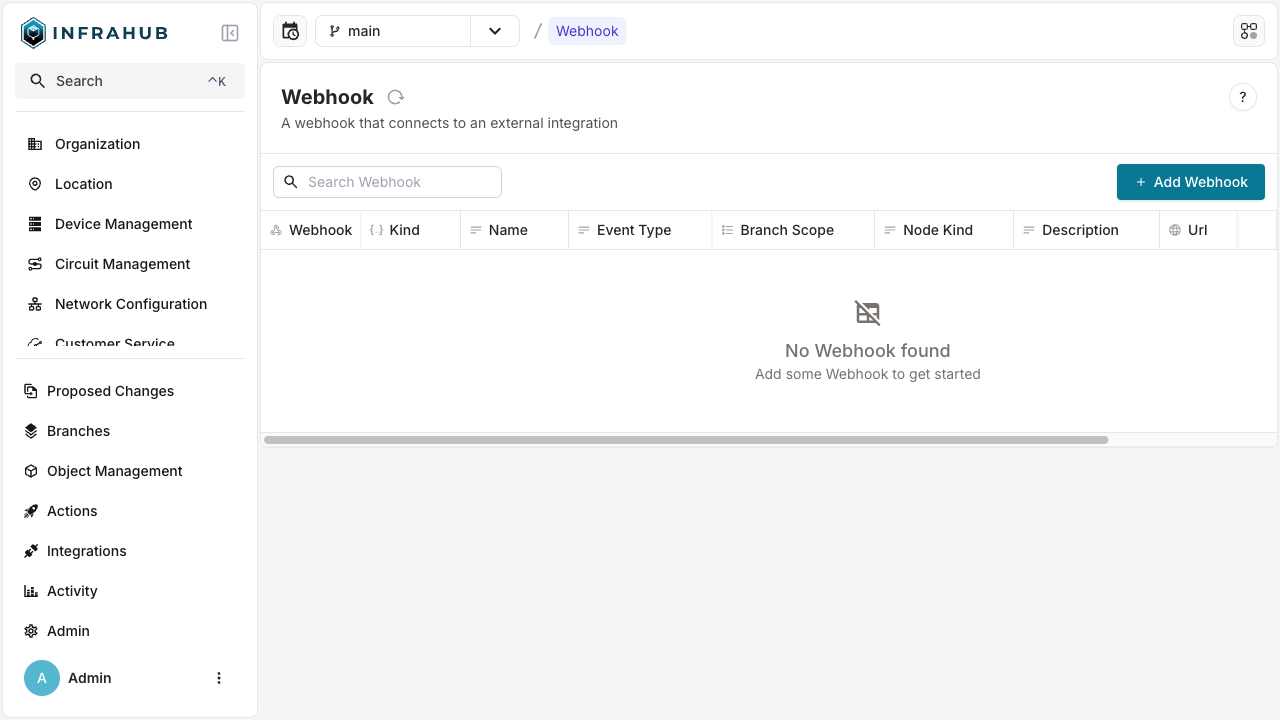
- Click + Add Webhook.
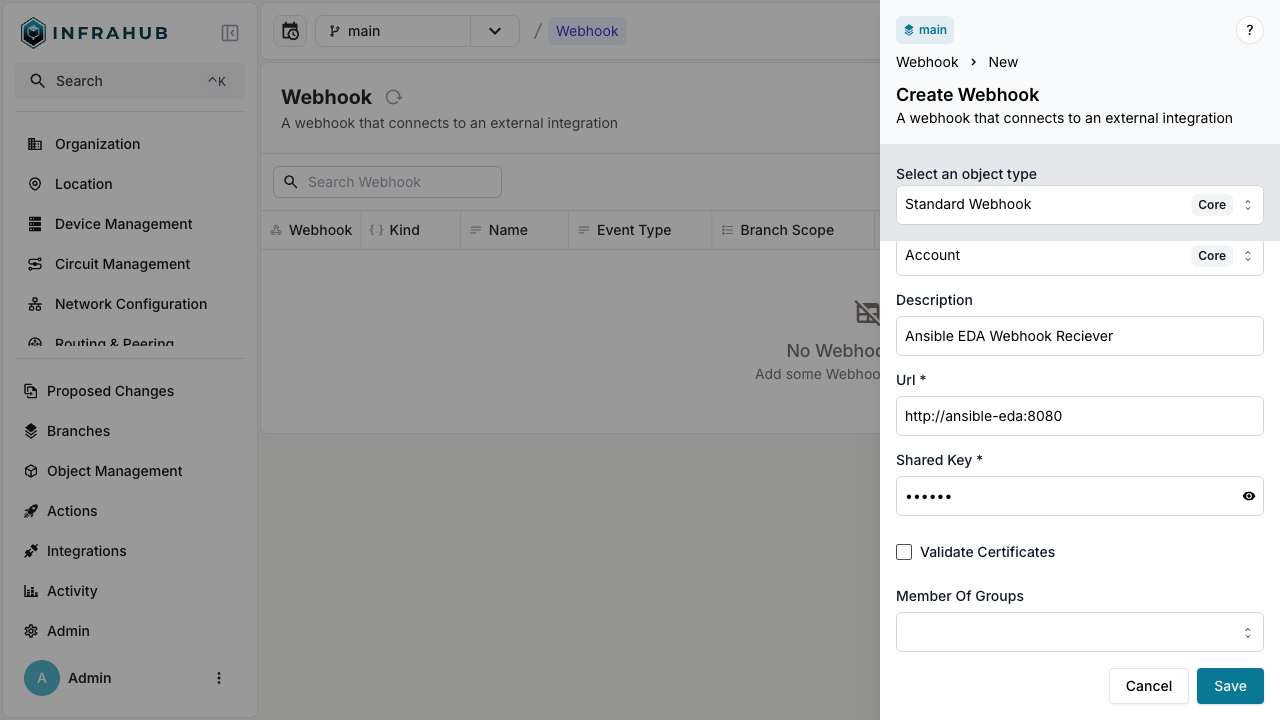
- Fill in the details and click Save.
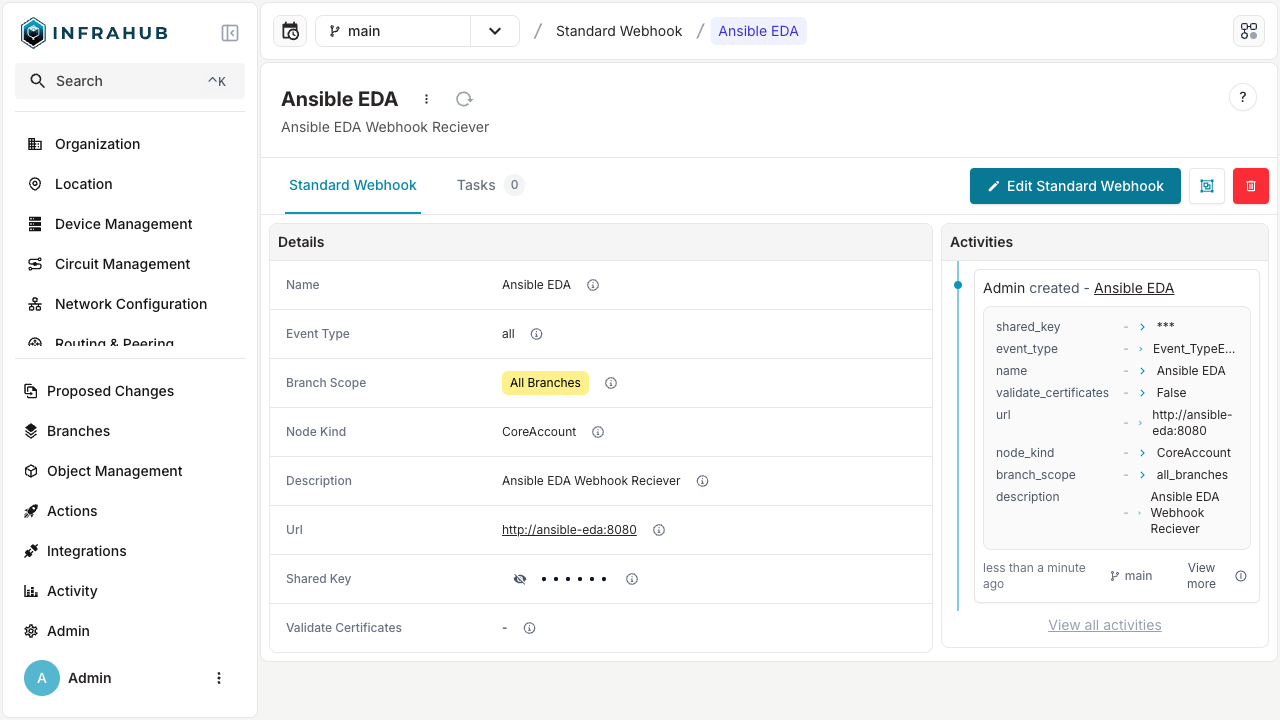
Creating a new Webhook
In the GraphQL sandbox, execute the following mutation, edit values to be appropriate for your use case:
mutation {
  CoreStandardWebhookCreate(
    data: {
        name: {value: "Ansible EDA"},
        description: {value: "Ansible Webhook Receiver"},
        branch_scope: {value: "all_branches"},
        url: {value: "http://ansible-eda:8080"},
        shared_key: {value: "supersecret"}
    }) {
    object {
      display_label
    }
  }
}
Creating a custom webhook with a Transformation
Custom webhooks allow you to transform event data before sending it to an external endpoint. This is useful when the receiving system expects a specific payload format, such as Slack, Microsoft Teams, GitHub Actions, or other third-party APIs.
For general information about Python Transformations, see the Python Transformation guide. For details about webhook events and payloads, see the webhooks topic.
When using a Transformation with a webhook, the Transformation receives the webhook event data directly instead of executing its GraphQL query. The query attribute is still required on the Transformation class but is not used. See GitHub issue #6650 for updates on this requirement.
1. Create the Python Transformation
Create a Python file with a Transformation class that processes webhook event data. The Transformation receives a dictionary containing the event information:
from typing import Any

from infrahub_sdk.transforms import InfrahubTransform


class SlackWebhookTransform(InfrahubTransform):
    query = "placeholder_query"  # Required but not used for webhooks
    timeout = 10

    async def transform(self, data: dict[str, Any]) -> dict[str, Any]:
        event_type = data.get("event", "unknown")
        node_data = data.get("data", {})
        node_kind = node_data.get("kind", "Unknown")
        action = node_data.get("action", "unknown")

        # Format payload for Slack incoming webhook
        return {
            "text": f"Infrahub: {node_kind} {action}",
            "blocks": [
                {
                    "type": "section",
                    "text": {
                        "type": "mrkdwn",
                        "text": f"*Event:* `{event_type}`\n*Kind:* {node_kind}\n*Branch:* {data.get('branch') or 'default'}"
                    }
                }
            ]
        }
The data parameter contains:
| Field | Description |
|---|---|
data | Original event payload (node changes, changelog, etc.) |
id | Unique event identifier (UUID) |
event | Event type, such as infrahub.node.updated |
branch | Branch name or None for branch-independent events |
account_id | UUID of the account that triggered the event |
occured_at | ISO 8601 timestamp of when the event occurred |
See the webhooks topic for example event payloads.
2. Create a placeholder GraphQL query
Create a GraphQL query file. This query is required but not executed for webhook Transformations:
query PlaceholderQuery {
  InfrahubStatus {
    summary {
      active_schema_hash
    }
  }
}
3. Configure .infrahub.yml
Add the Transformation and query to your repository configuration:
# yaml-language-server: $schema=https://schema.infrahub.app/python-sdk/repository-config/latest.json
---
python_transforms:
  - name: slack_webhook_transform
    class_name: SlackWebhookTransform
    file_path: "transforms/slack_webhook.py"

queries:
  - name: placeholder_query
    file_path: "queries/placeholder.gql"
4. Add the repository to Infrahub
Add your repository containing the Transformation to Infrahub. See the repository guide for instructions.
5. Create the custom webhook
- Via the Web Interface
- Via the GraphQL Interface
- Navigate to Integrations > Webhooks.
- Click + Add Webhook.
- Select Custom Webhook as the type.
- Fill in the webhook details:
- Name: A descriptive name, such as "Slack Notifications"
- URL: The destination endpoint
- Event Type: The event to trigger on, such as
infrahub.node.updated - Branch Scope: Which branches should trigger this webhook
- Select your Transformation from the Transformation dropdown.
- Click Save.
First, get the Transformation ID:
query GetTransform {
  CoreTransformPython(name__value: "slack_webhook_transform") {
    edges {
      node {
        id
      }
    }
  }
}
Then create the custom webhook:
mutation CreateCustomWebhook {
  CoreCustomWebhookCreate(
    data: {
      name: {value: "Slack Notifications"}
      description: {value: "Send node change notifications to Slack"}
      url: {value: "https://hooks.slack.com/services/XXX/YYY/ZZZ"}
      event_type: {value: "infrahub.node.updated"}
      branch_scope: {value: "default_branch"}
      transformation: {id: "<transform-id-from-query>"}
    }
  ) {
    object {
      id
      display_label
    }
  }
}
6. Verify the webhook
- Make a change that triggers the configured event. For example, update a node if using
infrahub.node.updated. - Check that your external endpoint received the transformed payload.
For troubleshooting, check the Infrahub logs for webhook delivery status and any Transformation errors.
Adding custom headers
Webhooks can include custom HTTP headers for authentication, routing metadata, or any other headers the receiving system requires. Headers are defined as reusable key-value pair entities — either static values or references to environment variables — and can be shared across multiple webhooks. For details on header types, merge behavior, and environment variable resolution, see the webhooks topic.
- Via the Web Interface
- Via the GraphQL Interface
- Navigate to Integrations > Key/Value.
- Click + Add Key Value.
- Fill in the fields:
- Name: A human-friendly identifier, such as "API Auth Token"
- Key: The HTTP header field name, such as
Authorization - Value: The header value, such as
Bearer eyJhbGci...
- Click Save.
- Navigate to Integrations > Webhooks and select your webhook.
- In the Headers relationship, associate the key-value pair you created.
- Click Save.
First, create a key-value pair for the header:
mutation CreateHeader {
  CoreStaticKeyValueCreate(
    data: {
      name: {value: "API Auth Token"}
      key: {value: "Authorization"}
      value: {value: "Bearer eyJhbGci..."}
    }
  ) {
    object {
      id
      display_label
    }
  }
}
Then, update your webhook to associate the header:
mutation AddHeaderToWebhook {
  CoreStandardWebhookUpdate(
    data: {
      id: "<webhook-id>"
      headers: [{id: "<header-id>"}]
    }
  ) {
    object {
      id
      display_label
    }
  }
}
Authentication header values must include the full value including any type prefix. For example, for Bearer token authentication, set the value to Bearer eyJhbGci... (not just the token). For environment-variable-based headers that resolve secrets at send time, use CoreEnvKeyValue instead — see the webhooks topic for details.