Query historical data
You can read infrastructure data as it existed at previous points in time, and compare how it changed between them. A timestamped query answers what current data cannot: which devices and interfaces existed for a site during last night's incident, which interface attributes changed between the last known-good time and now, or which prefixes were assigned to a site on a given date.
Infrahub offers three ways to ask about the past, and they answer different questions:
| What you need | How to ask | Where it is covered |
|---|---|---|
| The state of the data at one point in time | at and branch on a read | Query data at a specific time |
| Which objects and attributes changed between two points | DiffUpdate, then DiffTree | Compare changes between two timestamps |
| Which operations were performed between two points, and by whom | since and until on an event query | Querying the activity log over the API |
The first two read the data itself. The third reads the record of operations that produced it — see Immutable history for which question each one answers.
Specify a branch and a time
To read the state of the data at a specific point in time, specify a branch and a timestamp. Infrahub returns the objects, attribute values, and related objects that were valid at that time. If you do not set either one, Infrahub returns the current data from the default branch.
| State to read | Branch | Time |
|---|---|---|
| Production as it stands | default | now |
| Production during last night's incident | default | a time within the incident |
| The change someone is proposing | their branch | now |
| The default branch just before that change merged | default | a time before the merge |
How historical queries work
When you add a timestamp to a query, Infrahub evaluates each requested object using the attribute values and relationships that were valid at that time. You use the same query structure as you do for current data; the timestamp changes which versions Infrahub returns.
Infrahub can return those versions because a change records a new value alongside the previous one rather than replacing it. History is recorded per object, per attribute, and per relationship, which is what lets a comparison identify the specific fields or connections that changed and what they held before. See How Infrahub preserves history for the storage model.
The schema is evaluated for the same point in time. If the schema changed after the timestamp you request, Infrahub loads the schema as it was then, so the query sees the objects, attributes, and relationships that existed at that point rather than the current ones.
A timestamp applies to read operations only — queries, in GraphQL terms. If a query document contains a mutation, Infrahub ignores the timestamp and applies the mutation at the current time.
Once Infrahub records a version, a change made after it does not alter that version. See Immutable history for more detail on how Infrahub preserves those versions and how immutable history relates to branches and the Activity log.
Query data at a specific time
Use a timestamp when you need the objects, attributes, and relationships that existed at a known point — for example, during an incident or before a change.
You can specify a time when viewing or querying Infrahub data through the web interface, GraphQL, REST API, or Python SDK. Use the web interface for interactive investigation and the APIs or SDK when you need a repeatable or programmatic query.
- Web interface
- GraphQL
- REST API
- Python SDK
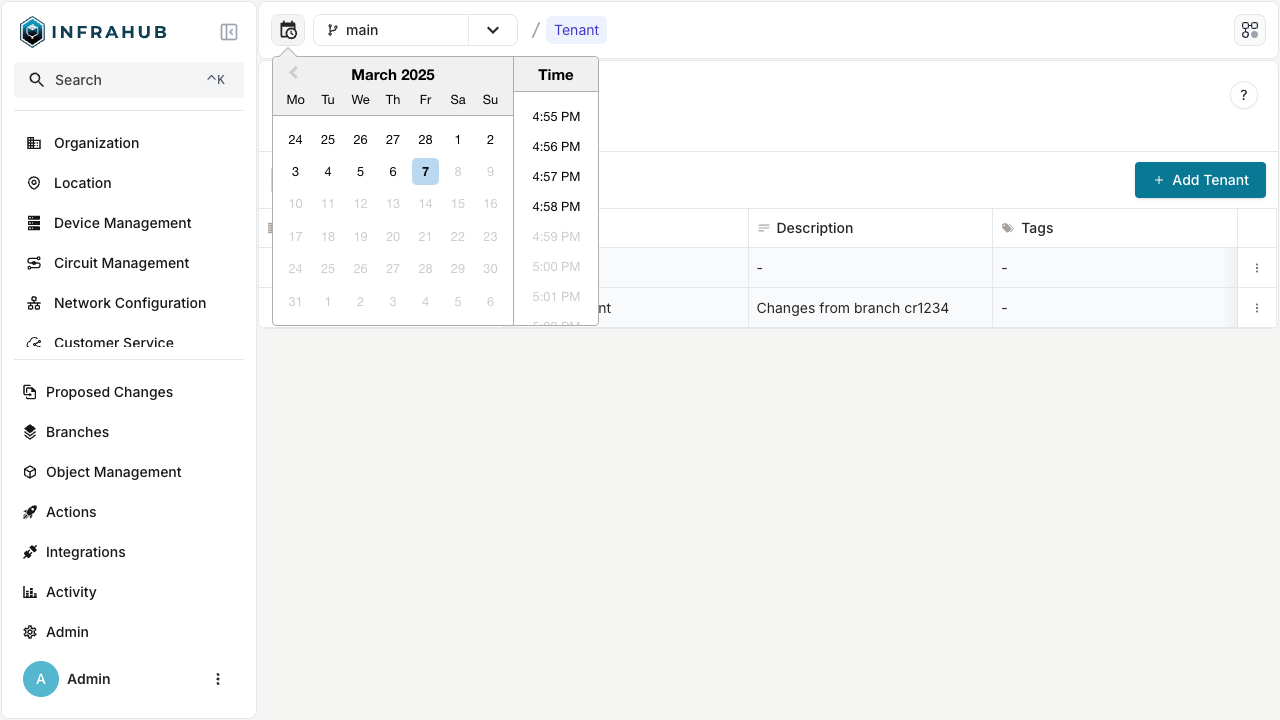
Select the time selector — the calendar and clock icon beside the branch selector — and choose a date and time. The picker uses your browser's time zone rather than UTC, and offers past dates and times only. Until you set a time, the selector displays only the icon; once you set one, the bar beside it displays Current view time with your selection. Select the × beside the displayed time to return to the current time.
The selected time stays applied as you navigate, and it covers more than object data. Attribute values, relationships, the schema, and the navigation menu are all loaded for that timestamp, so an object's fields and the navigation tree can differ from what the current schema defines. Diffs, Proposed Changes, tasks, and events have no time-aware query, so those screens show current data even while Current view time is displayed.
The selected time is part of the page URL as the at parameter, and it is preserved as you navigate, so you can bookmark a historical view or share it as a link.
Infrahub does not prevent editing while a past time is applied, and it does not warn you. A change you save — including a deletion — applies to the current data at the current time, not to the time you are viewing. Treat a view with Current view time set as read-only.
Use the at URL parameter to specify the timestamp for a GraphQL query. at goes on the endpoint, not in the query document, so the document itself is unchanged from the one you use for current data:
http://localhost:8000/graphql/main?at=2026-03-09T14:00:00Z
query DeviceAtTime {
  InfraDevice(name__value: "ord1-edge1") {
    edges {
      node {
        name { value }
        description { value }
        status { value }
      }
    }
  }
}
The REST API accepts at on the endpoints that run stored objects, not on ad-hoc object reads:
| Endpoint | Returns |
|---|---|
/api/query/{query_id} | The result of a stored CoreGraphQLQuery at that time |
/api/artifact/{artifact_id} | An artifact rendered from the data valid at that time |
/api/transform/python/{transform_id} | A Python transform run against that data |
/api/transform/jinja2/{transform_id} | A Jinja2 transform rendered from that data |
To read objects at a past time over REST, save the read as a CoreGraphQLQuery and execute it by name:
curl "http://localhost:8000/api/query/device-status?branch=main&at=2026-03-09T14:00:00Z" \
  -H "X-INFRAHUB-KEY: $INFRAHUB_API_TOKEN"
Pass the at argument to the SDK query methods when you need a node or set of nodes as they existed at a specific time. all(), get(), and filters() take a Timestamp; execute_graphql() also accepts a string.
from infrahub_sdk import InfrahubClient
from infrahub_sdk.timestamp import Timestamp

client = InfrahubClient(address="http://localhost:8000")

device = await client.get(
    kind="InfraDevice",
    name__value="ord1-edge1",
    at=Timestamp("2026-03-09T14:00:00Z"),
)
Compare changes between two timestamps
Comparing two timestamps takes two steps: Infrahub calculates the diff, then you retrieve it. A diff is stored rather than computed when you ask for it, which is why a query for a period that has never been calculated returns null instead of a result.
Send the DiffUpdate mutation to calculate the diff. A custom period requires both the time range and a name to store it under — without a name, Infrahub rejects the request. Pass wait_until_completion: true when the mutation should return only once the calculation has finished, rather than starting a background task.
mutation CalculateIncidentDiff {
  DiffUpdate(
    data: {
      branch: "main"
      name: "incident-2026-03-09"
      from_time: "2026-03-09T00:00:00Z"
      to_time: "2026-03-10T00:00:00Z"
    }
    wait_until_completion: true
  ) {
    ok
  }
}
Then retrieve it with the same branch and time range you calculated it for, using DiffTree for the changed nodes or DiffTreeSummary when you only need counts. The timestamps do not need to align with a branch point or a Proposed Change, so you can compare any useful period, such as the hours around an incident.
Retrieve a custom period by that period rather than by its name. DiffTree looks for a diff covering the range it computes by default, from the branch point to the present, so it does not find one stored for a different range and returns null. DiffTreeSummary does not accept name at all and returns an error. A name is still worth setting, because DiffUpdate requires one for a custom period.
query IncidentChanges {
  DiffTree(
    branch: "main"
    from_time: "2026-03-09T00:00:00Z"
    to_time: "2026-03-10T00:00:00Z"
  ) {
    num_added
    num_updated
    num_removed
    nodes {
      kind
      label
      status
      attributes {
        name
        status
      }
    }
  }
}
Behavior to expect:
- Omit
from_timeand the comparison starts at the branch'sbranched_fromtimestamp. - Omit
to_timeand the comparison runs to the present. - Narrow the result with
filters, which acceptsids,kind,namespace, andstatus. Thekind,namespace, andstatusfilters each takeincludesandexcludeslists. - Page through results with
limitandoffset. - The base of the comparison is the default branch. Name a feature branch to compare it with the default branch across the requested period, or name the default branch to compare it with itself over time.
- Pass
proposed_change_idinstead of a branch and period to retrieve the diff for a Proposed Change. - A
nullresult means that no diff covering the requested period has been calculated, not that nothing changed.
In the web interface, a branch's Branch view shows its diff and lets you refresh it, whether or not a Proposed Change exists for that branch, and a Proposed Change shows the diff between its source and target branches. When you need review, validation, and checks alongside the comparison, use a Proposed Change.
Choose an absolute timestamp or relative offset
Use a relative offset when you are investigating from the current time. Use an absolute timestamp when the query needs to resolve to the same time each time it runs — for example, for an audit answer, post-incident report, or reproducible analysis.
| Form | Example | Resolves to |
|---|---|---|
| ISO 8601 with a zone or offset | 2026-03-09T14:00:00Z or 2026-03-09T15:00:00+01:00 | The specified instant |
| ISO 8601 without a zone | 2026-03-09T14:00:00 | The same wall-clock time, interpreted as UTC |
| Date only | 2026-03-09 | 12:00 UTC on that day |
| Offset from now | 30s, 45m, 6h, 2h30m | That interval before the current time |
A date without a time resolves to midday rather than midnight, so include an explicit time when a day boundary matters. Relative offsets support seconds, minutes, and hours, including combined values such as 2h30m. They do not support day or week units; use an absolute timestamp for those intervals.
Understand branch history limits
Every branch reads history through the default branch, so the earliest time you can query is the default branch's creation time — the point at which Infrahub was first initialized. That floor is the same on a feature branch as on the default branch, because creating a branch records where it diverged rather than copying the dataset. A branch created this morning can still be read back to the default branch's creation, with the changes recorded on the branch since it diverged added to that history.
If you request an earlier time than that, Infrahub rejects the query rather than returning partial data:
Requested time '2026-01-05T00:00:00Z' is before branch 'main' was created at '2026-02-01T09:14:22.481000Z'.
Infrahub validates the earliest time only. If you request a time later than the current time, Infrahub accepts it and returns the current data, because every attribute value and relationship that is valid now is also valid at a later time. In the web interface, the time selector offers past dates and times; through GraphQL, the REST API, and the Python SDK, you can request a future time. If you build the timestamp from a variable or a calculation, confirm it resolves to a past time — nothing in the response indicates that a future timestamp was used.
Related
- Immutable history — how Infrahub preserves previous values and relationships
- Branches — how branches diverge, share history, and merge
- Activity log — which operations occurred, when, and by whom
- Proposed Changes — compare a branch with its base with review, validation, and checks