File objects
Infrastructure management often involves more than just structured data. Contracts, documents, and pictures are all essential assets that relate directly to the devices, circuits, and services they describe. Infrahub's file object feature lets you attach files to any node in the graph, making these files first-class citizens of your infrastructure data model with full version control, branch isolation, and permission enforcement.
Why file objects matter
In many organizations, infrastructure documentation lives in separate systems: contracts in a shared drive, documents in a wiki, pictures on a file server. This separation creates a gap between the data that describes the infrastructure and the files that support it. When a circuit contract expires, the team managing the circuit may not know where to find the document. When a site photo needs to be traced back to a specific installation, the link between the two is maintained manually, if at all.
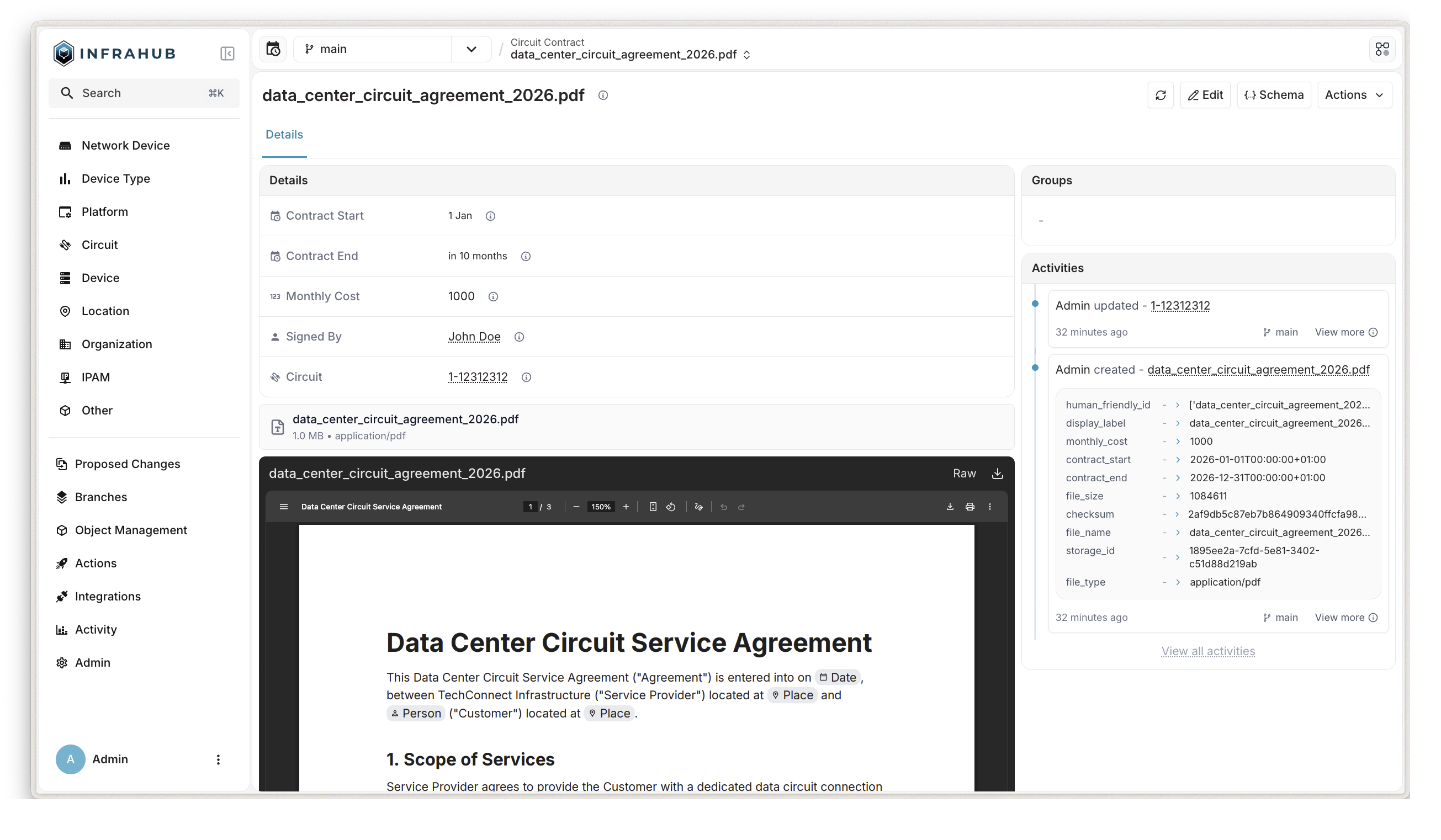
File objects bridge this gap by storing files alongside the infrastructure data they relate to. A circuit contract becomes a node in the graph, linked to the circuit it covers. A site photo becomes a node linked to the location it documents. This means that when you query a circuit, you can also retrieve its contracts, and when you view a site, you can access its associated pictures, all from the same system and the same API.
Concepts and definitions
A file object is an Infrahub node that combines structured metadata with a stored binary file. It inherits from the CoreFileObject generic, which provides a set of system-managed attributes that are automatically populated when a file is uploaded.
| Attribute | Description |
|---|---|
file_name | Original filename as uploaded |
file_size | File size in bytes |
file_type | MIME type detected from file content |
checksum | SHA-1 checksum of the uploaded file |
storage_id | Internal identifier linking the node to the stored file |
All of these attributes are read-only. The system populates them during upload, so there is no risk of metadata drifting out of sync with the actual file content.
A user-defined file object type is a node kind that inherits from CoreFileObject and adds custom attributes and relationships. This is how you model domain-specific file types, such as circuit contracts with start and end dates, or firmware images with version numbers.
How it works
Schema-driven design
File objects follow the same schema-driven approach as every other node in Infrahub. You define a file object type in your schema by inheriting from CoreFileObject and adding whatever attributes and relationships make sense for your use case.
For example, to model circuit contracts:
# yaml-language-server: $schema=https://schema.infrahub.app/infrahub/schema/latest.json
---
version: "1.0"
nodes:
  - name: CircuitContract
    namespace: Network
    inherit_from:
      - CoreFileObject
    attributes:
      - name: contract_start
        kind: DateTime
        optional: false
      - name: contract_end
        kind: DateTime
        optional: false
    relationships:
      - name: signed_by
        peer: CoreAccount
        kind: Attribute
        cardinality: one
        optional: true
      - name: circuit
        peer: NetworkCircuit
        kind: Attribute
        cardinality: one
        optional: true
This schema definition creates a NetworkCircuitContract node kind that has all the automatic file metadata from CoreFileObject, plus custom fields for contract dates and relationships to the signer and the circuit.
You can also define relationships from the other direction. A NetworkCircuit node can have a contracts relationship pointing back to its contract files, making it possible to navigate from either side of the relationship.
Storage architecture
File content is persisted in Infrahub's object storage layer, which is completely separate from the graph database. The storage layer is an immutable key-value system where each file is identified by a UUID. Once a file is stored, it is never modified or deleted. This immutability is what enables version control and time travel for files.
The graph database handles all the branch-aware, time-aware logic. A file object node contains a storage_id attribute that points to the stored file. When you update a file, Infrahub stores the new version under a new UUID and updates the node's storage_id on the current branch. The original file remains untouched in storage, and any branch or point in time that referenced the old storage_id continues to resolve to the original file.
Version control integration
Because file object nodes are regular Infrahub nodes, they inherit the full version control capabilities of the platform:
- Branching: Create or update file objects on a branch, and the changes remain isolated until merged. The main branch continues to see the original file.
- Time travel: Query a file object at any point in time using the
atparameter. Infrahub resolves thestorage_idthat was active at that moment and retrieves the corresponding file from storage. - Proposed changes: File object modifications appear in proposed changes just like any other data change, enabling peer review of file updates before they reach the main branch.
Merge conflicts for file objects are resolved at the attribute level, not the object level. In rare cases, this could result in mismatched checksum and storage_id values after conflict resolution. Object-level conflict resolution for file objects is planned for a future release.
Permission enforcement
File objects integrate with Infrahub's permission system. Downloading a file requires VIEW permission on the file object node. Creating or updating a file object requires the corresponding CREATE or UPDATE permissions. This means that access to files is governed by the same role-based access control that protects the rest of your infrastructure data.
Use cases
Storing contracts
A network team managing hundreds of circuits can define a NetworkCircuitContract file object type with attributes for contract dates and a relationship to the circuit. When a new contract is signed, the team uploads the PDF and links it to the circuit. Anyone querying the circuit can see its associated contracts, check expiration dates, and download the documents, all from the Infrahub API or UI.
When a contract is renewed, the team uploads the new document on a branch, updates the contract dates, and submits a proposed change for review. The main branch continues to show the original contract until the change is approved and merged.
Documents
Teams can attach operational documents — handover reports, maintenance logs, or compliance certificates — to the infrastructure nodes they relate to. Because file objects support time travel, the team can retrieve the document that was active at any point in time, which is valuable during audits.
Pictures
Site photos, rack elevation pictures, or equipment labels can be stored as file objects linked to locations or devices. When a site is surveyed, the team uploads pictures and associates them with the relevant nodes. Anyone querying the site can view the photos alongside the structured data.
Connection to other concepts
File objects build on several existing Infrahub features:
- Schema: File object types are defined in the schema, following the same inheritance model as other node kinds.
- Branching: File changes are isolated on branches and merged through the standard workflow.
- Proposed changes: File updates go through the same review process as data changes.
- Object storage: File content is persisted in Infrahub's storage layer, which supports local and S3 backends.
- Permissions and roles: File access is controlled by the same role-based permissions as other data.
- Artifact: While artifacts are system-generated outputs from transformations, file objects are user-uploaded documents. Both use the object storage layer, but they serve different purposes.
Operational considerations
File size limits
The maximum upload size defaults to 50 MB and can be adjusted through Infrahub's configuration. For example, to allow uploads up to 200 MB:
INFRAHUB_STORAGE_MAX_FILE_SIZE=200 # in MB, default is 50
For production deployments behind a reverse proxy, the proxy must also allow large request bodies.
How to configure Infrahub../guides/configuration-changesBackups
The file content for file objects is stored in the object storage layer, which is separate from the graph database.
Unlike artifacts, which can be regenerated from their definitions, user-uploaded files may only exist in object storage. Losing object storage without a backup means those files are unrecoverable. Both the graph database and object storage must be backed up together to maintain consistency.
Further reading
- Object storage: Storage backend configuration and architecture
- Version control: How Infrahub tracks changes over time
- Branching: Working with branches for isolated changes